Aahar Jharkhand (aahar.jharkhand.gov.in) झारखंड के लोगों के लिए ऑफिशियल PDS गेटवे है। 6 जनवरी, 2026 से, सिस्टम ज़रूरी आधार e-KYC वेरिफिकेशन और JSFSS ग्रीन कार्ड अपडेट को प्राथमिकता दे रहा है। मंथली एलिजिबिलिटी लिस्ट देखने, अपना ई-राशन कार्ड डाउनलोड करने और आवटन (अलॉटमेंट) डिटेल्स ट्रैक करने के लिए पोर्टल का इस्तेमाल करें ताकि यह पक्का हो सके कि आपके फ़ूड सिक्योरिटी बेनिफिट्स एक्टिव रहें।
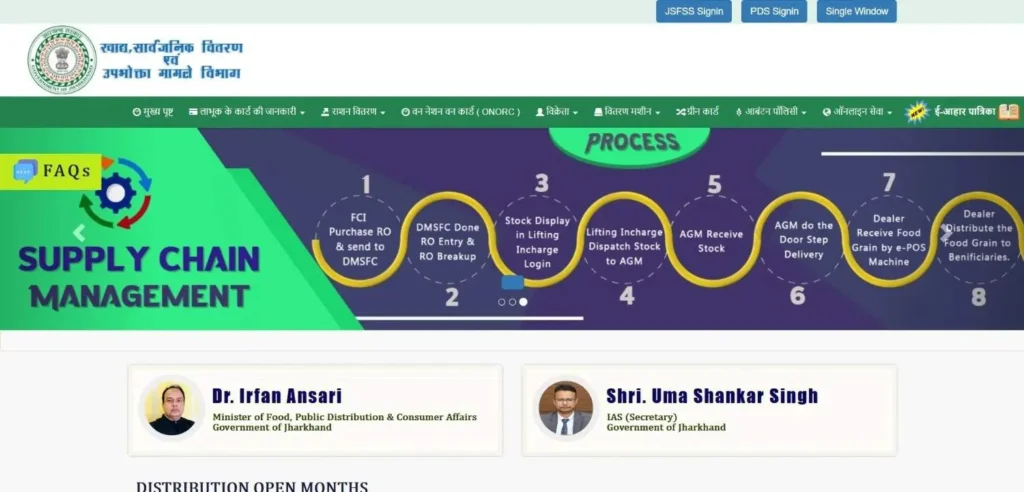
झारखंड के नागरिकों के लिए ज़रूरी PDS अपडेट
आहार झारखंड पोर्टल नेशनल फ़ूड सिक्योरिटी एक्ट (NFSA) के तहत लाखों लोगों के लिए लाइफ़लाइन बना हुआ है। चाहे आप AAY (अंत्योदय) या PHH (प्रायोरिटी हाउसहोल्ड) स्कीम का हिस्सा हों, 2026 में “घोस्ट कार्ड” को खत्म करने के लिए डिजिटल वेरिफ़िकेशन पर ज़्यादा ध्यान दिया जाएगा।
अगर इस महीने आपका कार्ड “इनएक्टिव” मार्क किया हुआ मिलता है, तो शायद यह चल रहे आधार सीडिंग ड्राइव की वजह से है। नीचे 2026 में सबसे ज़्यादा सर्च की जाने वाली सर्विसेज़ तक आपका सीधा रास्ता बताया गया है:
- Ration Card Search: Verify if your name appears in the January 2026 Eligibility List.
- e-KYC Verification: Complete your biometric or OTP-based update to avoid benefit suspension.
- Download e-Ration Card: Get a digital, printable copy of your card using your RC number.
- Dealer (FPS) Tracking: Check your local dealer’s Aawatan (Allocation) and transaction history to ensure you receive your full quota.
ज़रूरी e-KYC अपडेट: आपका राशन क्यों ब्लॉक हो सकता है
2026 की शुरुआत में, झारखंड सरकार ने “घोस्ट बेनिफिशियरीज़” को खत्म करने के लिए पूरे राज्य में एक कैंपेन शुरू किया। इस प्रोसेस में यह वेरिफ़ाई करना शामिल है कि राशन कार्ड पर लिस्टेड हर व्यक्ति असली और एलिजिबल है। इसलिए, सिर्फ़ आधार सीडिंग अब काफ़ी नहीं है; परिवार के हर सदस्य को अब e-KYC वेरिफ़िकेशन पूरा करना होगा।
अगर किसी सदस्य का e-KYC “पेंडिंग” रहता है, तो महीने के अनाज (यूनिट) का उनका हिस्सा अपने आप सस्पेंड हो जाएगा। यह अपडेट पूरा करना ही यह पक्का करने का एकमात्र तरीका है कि आपके परिवार को NFSA और JSFSS स्कीम के तहत चावल, गेहूं और नमक का पूरा हिस्सा मिलता रहे।
How to Check Your e-KYC Status Online
आप ऑफिस जाए बिना सीधे ऑफिशियल पोर्टल पर अपना स्टेटस वेरिफाई कर सकते हैं। इन स्टेप्स को फॉलो करें:
- Official Website: Navigate to [aahar.jharkhand.gov.in].
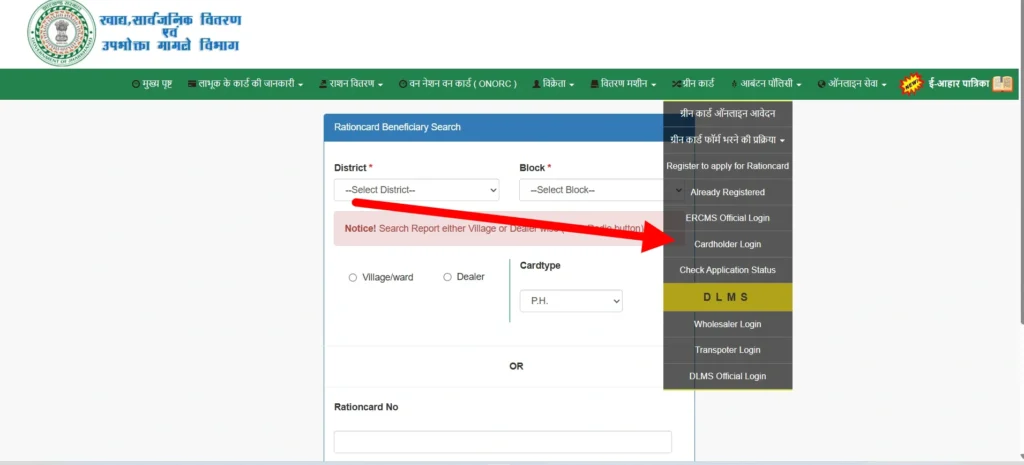
- Cardholder Login: On the main menu, click on “Cardholder Login” (कार्डधारक लॉगिन).
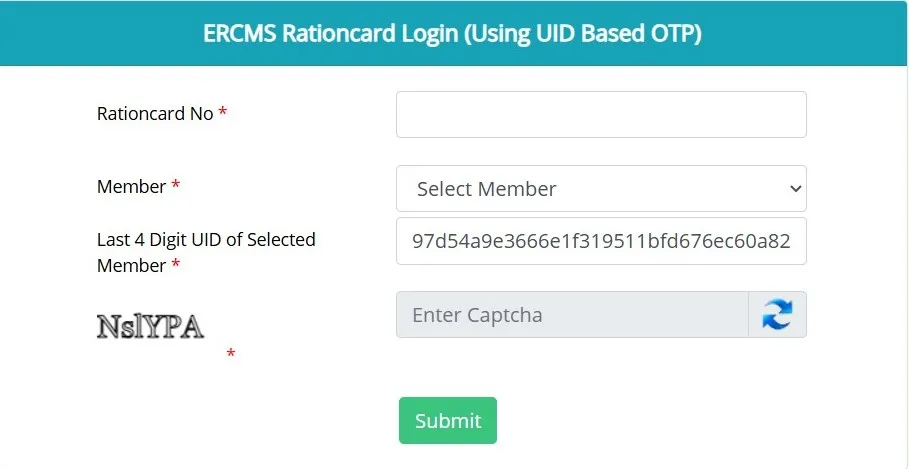
- Enter Credentials: Select “UID” or “Ration Card Number” as your login type. Enter your 12-digit Ration Card number, Select member, put your Last 4 Digit UID of Selected Member, enter captcha and then c.
- Check Family Details: Once logged in, look for the “Member e-KYC Status” dashboard.
- Verified: The member is secure.
- Pending/Not Seeded: Action is required immediately at your Fair Price Shop (FPS).
समस्या निवारण: “बायोमेट्रिक विफलता” या “OTP प्राप्त नहीं हुआ” को ठीक करना
टेक्निकल गड़बड़ियों की वजह से अक्सर सफल वेरिफिकेशन नहीं हो पाता है। सबसे आम दिक्कतों के लिए 2026 का ऑफिशियल तरीका यह है:
फिंगरप्रिंट/बायोमेट्रिक फेलियर: अगर डीलर की e-POS मशीन आपके अंगूठे के निशान को नहीं पहचान पाती है, तो IRIS स्कैनर (आई स्कैन) के ज़रिए “मैन्युअल ओवरराइड” के लिए रिक्वेस्ट करें, जो ज़्यादातर मॉडर्न FPS दुकानों पर मिलता है।
OTP की दिक्कतें: अगर आपका आधार से लिंक्ड मोबाइल इनएक्टिव है, तो OTP नहीं आएगा। आपको पहले किसी प्रज्ञा केंद्र (CSC) या आधार सेवा केंद्र पर अपना मोबाइल नंबर अपडेट करना होगा।
कमज़ोर नागरिकों के लिए “गैप-फिलर”: बुज़ुर्गों, दिव्यांगों, या जिनके फिंगरप्रिंट फीके पड़ गए हैं, उनके लिए झारखंड सरकार ऑफलाइन वेरिफिकेशन की इजाज़त देती है। आप अपने e-KYC को मैनुअली ऑथेंटिकेट करवाने के लिए अपने ब्लॉक सप्लाई ऑफिसर (BSO) को एक फिजिकल सेल्फ-डिक्लेरेशन फॉर्म जमा कर सकते हैं।
Aahar Jharkhand Online Services
Beneficiary Search (पात्रता सूची / मासिक विवरण)
- User Intent: To verify if your name is active on the current month’s distribution list.
- Official Steps: 1. On the homepage, go to “लाभूक के कार्ड की जानकारी” (Beneficiary Information).
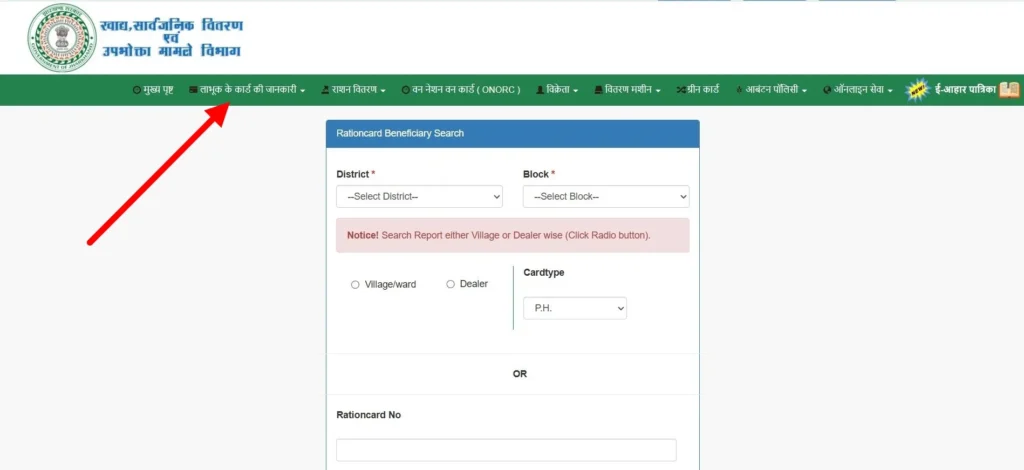
- Click on “पात्रता सूची (मासिक)” (Monthly Eligibility List).
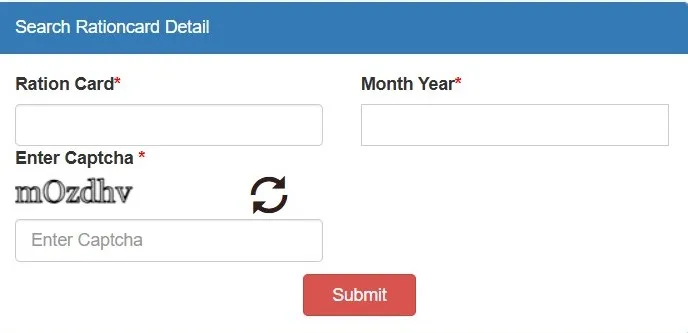
- Enter Ration card.
- Then enter the current month/year, enter Captcha, and click on submit to view the live list.
Download e-Ration Card (झारखंड राशन कार्ड डाउनलोड)
- Tutorial: To get a digital copy, navigate to “कार्डधारक के विवरण” (Cardholder Details).
- The Process: Enter your 12-digit Ration Card Number. Once your family details load, scroll to the bottom and click the “Print” icon. This e-Ration card is a valid legal document for lifting grain at any e-POS center.
Allotment (Aawatan) & Transaction History
- The Logic: Jharkhand distributes regular NFSA grain and state-specific JSFSS (Green Card) grain.
How to Verify: Select “वितरण का विवरण” (Distribution Details) to see your Transaction History. Check this before visiting the shop to know exactly how many kilograms of Rice/Wheat you are entitled to, preventing dealer fraud.
Apply for a New Ration Card: Complete Process
नए एनरोलमेंट के लिए ज़रूरी डॉक्यूमेंट्स
| Document | Specific Requirement for 2026 |
|---|---|
| Aadhaar Card | Mandatory for every family member (Seeded). |
| Income Certificate | For PHH/Green cards; must be within valid limits. |
| Bank Passbook | Front page of the Head of Family (Female). |
| Self-Declaration | Downloadable form affirming you don’t own a 4-wheeler or large land. |
Adding or Removing Family Members
- Expert Insight: Adding a newborn requires the Birth Certificate; removing a member (due to death/marriage) requires a Death/Surrender Certificate.
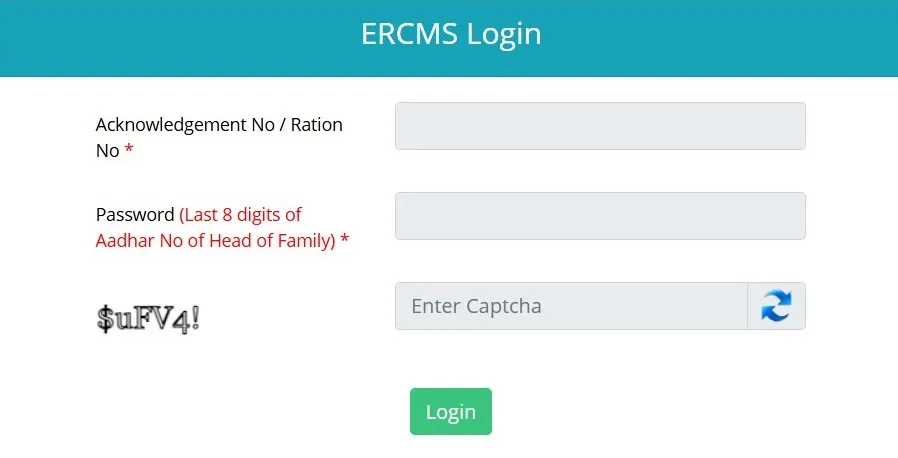
- The ERCMS Workflow: Go to “Online Service” > “Online Application”.
- Click on “Already Registered” and log in using your Ration Card number and the Aadhaar of the Head of Family.
- Select “Add Member” or “Remove Member” from the dashboard.
The “Golden Rule”: After clicking “Submit” online, you must print the receipt and submit it to your BSO (Block Supply Officer). Offline verification is mandatory for approval in 2026.
Types of Ration Cards in Jharkhand: Which One Do You Have?
झारखंड में, आपके कार्ड का रंग आपकी महीने की “हक़दारी” (हक) तय करता है। NFSA 2013 और JSFSS के तहत, 2026 का ऑफिशियल ब्रेकडाउन यहाँ दिया गया है:
- AAY (Antyodaya Anna Yojana) – Yellow Card
- Who it’s for: The poorest of the poor (widows, disabled heads of household, primitive tribes).
- Benefits: A fixed 35kg of food grains per family per month (typically 21kg Rice / 14kg Wheat) at $Re. 1$ per kg.
- PHH (Priority Household) – Pink/Saffron Card
- Who it’s for: Families meeting the state’s inclusion criteria (rural poor, laborers).
- Benefits: 5kg of food grains per person (unit) monthly. If you have 6 members, you get 30kg total.
- JSFSS (State Food Security Scheme) – Green Card
- Who it’s for: Households left out of the central NFSA list.
- Benefits: 5kg Rice per person at $Re. 1$ per kg, funded entirely by the Jharkhand State Government.
- White Card – APL (Non-Subsidized)
- Who it’s for: Families with an annual income above ₹1 Lakh.
Purpose: These act primarily as Identity & Address Proof. They do not carry a monthly grain entitlement but are used for kerosene or as a base for future scheme upgrades.
Common Problems & Quick Solutions (समस्याएं और समाधान)
As a senior specialist, I know that the portal often shows errors that leave users confused. Here are the Verified 2026 Fixes:
- “Member Not Found” Error
- The Cause: This usually happens when a member’s Aadhaar is seeded but not yet synced between the UIDAI server and the Jharkhand ERCMS database.
- The Fix: Wait 72 hours after seeding. If it persists, visit your BSO (Block Supply Officer) to trigger a “Manual Sync” on the portal.
- Dealer Denying Ration (Know Your Rights)
- The Law: Under NFSA 2013, a dealer cannot deny ration if your name is on the monthly list.
- The Action: If they claim “No Stock,” check the Aawatan (Allotment) Report on the Aahar portal. If the portal shows stock, call the Toll-Free Helpline (1967) immediately to lodge a “Dealer Malpractice” complaint.
- Card Showing ‘Inactive’ Status
- The Cause: Usually due to missing e-KYC or failure to lift ration for 3 consecutive months.
- The Fix: You cannot fix this online. You must visit the DSO (District Supply Officer) or BSO with your physical Aadhaar cards for all members. They will verify your “Physical Presence” and reactivate the card in the system.
District-Wise Aahar Jharkhand Support & Links
अपने लोकल राशन कार्ड की गिनती, डीलर लिस्ट, या ब्लॉक-स्पेसिफिक रिपोर्ट देखने के लिए, नीचे अपना ज़िला चुनें। हर लिंक उस इलाके के ERCMS डेटाबेस का रियल-टाइम एक्सेस देता है, जिससे “मेरे आस-पास PDS” वाली क्वेरी पूरी होती हैं:
| Ranchi | Dhanbad | Bokaro | Jamshedpur (East Singhbhum) |
|---|---|---|---|
| Hazaribagh | Deoghar | Giridih | Dumka |
| Palamu | Gumla | Ramgarh | Khunti |
| Godda | Sahebganj | Pakur | Jamtara |
| Garhwa | Latehar | Lohardaga | Chatra |
| Simdega | Koderma | Seraikela Kharsawan | West Singhbhum |
Instruction: Use the “District Wise Allotment” tab on the official portal to see if your specific area has received its grain stock for January 2026.
Official Helpline & Grievance Redressal
If you face issues with e-KYC or your dealer, use these official Jharkhand government channels:
- Toll-Free Helpline: Dial 1967 or 1800-345-6598.
- Online Complaint: Visit the PGMS (Public Grievance Management System) portal. Select “Khadya Sansthan” (Food Dept) and enter your Ration Card number to track your complaint.
Physical Redressal: Every District has a DSO (District Supply Officer) located at the Collectorate who acts as the primary grievance officer.
Frequently Asked Questions (FAQ)
Is “One Nation One Ration Card” (ONORC) active in Jharkhand?
Yes. If you are a Jharkhand cardholder working in another state, you can lift your ration from any e-POS enabled shop across India. Ensure your Aadhaar is seeded to your Jharkhand card to use this portability.
What is the official rate for Salt, Rice, and Wheat in 2026?
Under the NFSA and JSFSS (Green Card), Rice and Wheat are distributed at ₹1 per kg. Fortified Salt is often provided free or at a subsidized rate of ₹1 per packet depending on the current month’s cabinet order.
How long does a new ration card approval take?
Typically 30–45 days. The timeline depends on how fast you submit your digital acknowledgement to the BSO for physical field verification.
Important Notice: This is not the official government website. While we strive for 100% accuracy based on the latest 2026 PDS circulars, users are encouraged to perform final verifications on the official portal: [aahar.jharkhand.gov.in].